Workflow engine overview
This document describes the workflow engine at the level of its components and the reasons behind its design. It is for readers who need to understand the whole without the detail of any one part. The numbered pages, starting at the index, hold the detail.
Purpose
Every team runs processes made of steps: collect a record, have someone approve it, update a system, notify people, repeat next month. The workflow engine runs such processes for any team. A process is written once as a list of steps. The engine runs that list each time the process is needed, records every step, waits when a person must decide, and recovers when something fails.
Workflows
A workflow is a JSON file. It lists the steps in order and says how the result of one step feeds the next. Each step has one of a fixed set of types. Examples: call a service, ask a model, branch, run steps in parallel, wait for a person, wait for a time, hand work to a worker.
The file is the entire workflow. There is no program per workflow. Adding a workflow to the organisation means adding a file to a repository; the build pipeline checks it and registers it with the engine. Changing a workflow means a new version of the file. Old runs keep the version they started with.
This is the first design choice and the rest follow from it. Because workflows are data, one engine can run all of them and every run is recorded the same way. A change to how a step is performed does not touch the workflows that use it.
Architecture
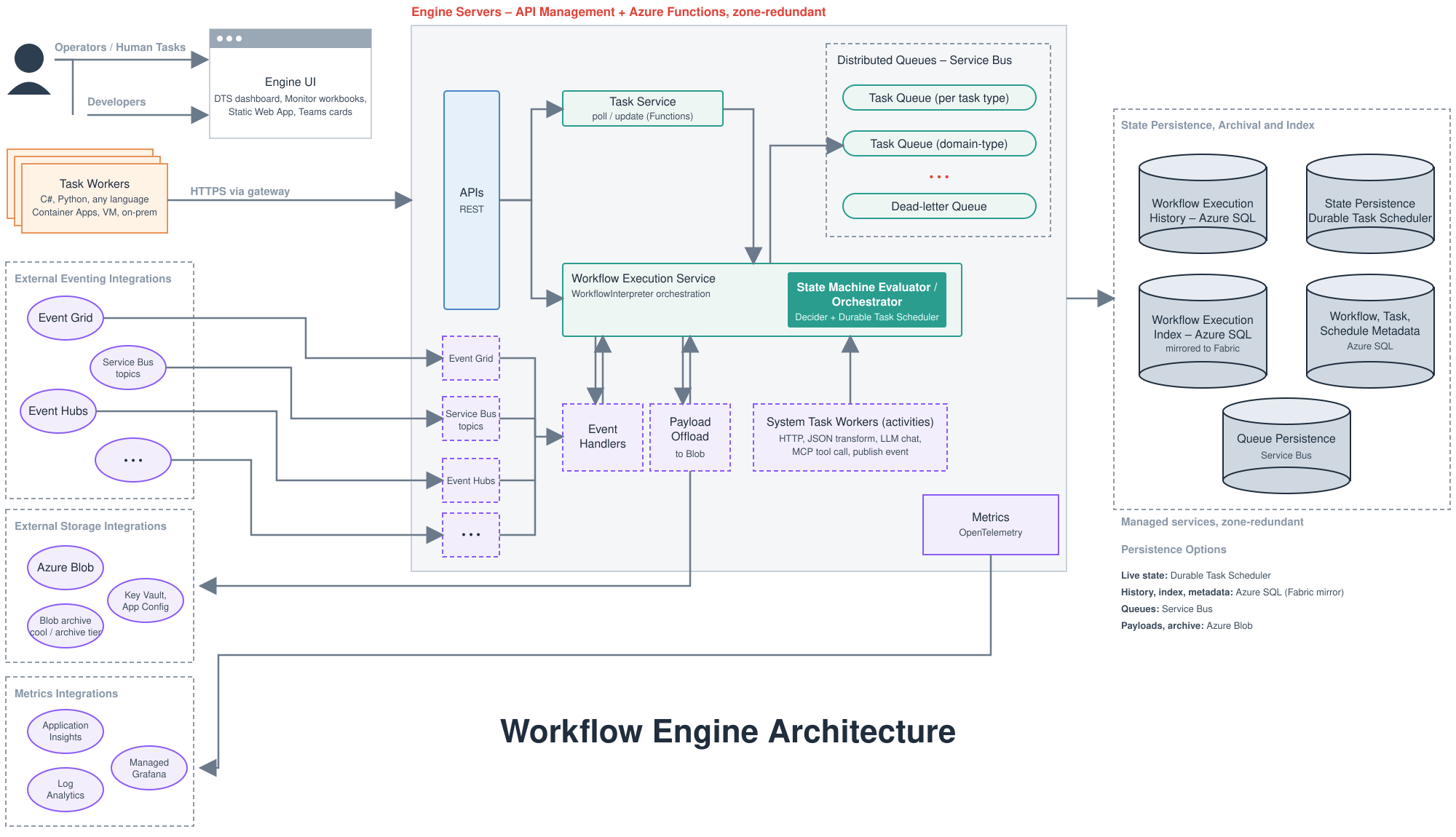
The diagram has three regions. The left side shows who and what calls the engine. The centre is the engine itself. The right side is where the engine keeps its records.
Callers
| Caller | Kind | Interaction |
|---|---|---|
| Developers | People | Write workflow files. Register them through the build pipeline. |
| Operators | People | Watch runs, retry or stop them, inspect queues. |
| Approvers | People | Answer approval requests, usually from a Teams card. |
| Applications | Programs | Start runs when a business event occurs. |
| Teams bridge | Program | Delivers approval cards and posts the answers back to the engine. |
| Workers | Programs, part of the platform | Ask for work, perform it, return results. See below. |
Every caller uses the same API through the same gateway, which checks identity and permissions. There is one way in.
Engine
The engine is one Azure Functions application with these parts:
| Part | Role |
|---|---|
| API | The single entry point for every caller. |
| Interpreter | Reads a workflow file and performs its steps in order, one run at a time. One interpreter serves every workflow. |
| System task activities | The engine's own code for generic steps: call a URL, reshape data, call a model, call a tool, publish an event. |
| Task queues | Waiting lines for steps that workers perform. One queue per step type, held in Azure Service Bus. |
| Event handlers | Rules that start or continue runs when a message arrives from another system. |
| Scheduler | Starts runs on a timetable. |
Records
| Record | Contents | Service |
|---|---|---|
| Definitions | Every workflow file and version, plus settings per step type | Azure SQL |
| Live state | Where each running workflow is, so it can continue after any interruption | Durable Task Scheduler |
| History | Every run and every step: inputs, outputs, timing, outcome | Azure SQL, mirrored to Fabric for analysis |
| Large data and archive | Inputs and outputs too large for a table; finished runs past their retention period | Azure Blob Storage |
Design rationale
One interpreter for all workflows
The interpreter is the only piece of run logic. It has no knowledge of any particular workflow; it reads a file and acts on it. One code path means one thing to test, monitor, and fix. It also means the engine is finished when the interpreter is, and new workflows require no engineering time on the engine.
Durable state in a managed service
A run may wait days for an approval. During that time nothing should be running and nothing should be lost. Durable Task Scheduler, an Azure service, stores each run's position and resumes it when a decision arrives, a timer fires, or a worker reports back. The engine does not implement its own persistence, locking, or recovery. Those are the hardest parts of a workflow system and they are bought, not built.
System tasks for generic work
Most steps are generic: call an API, transform a result, ask a model, branch on an answer. The engine performs these itself. A workflow made only of such steps needs nothing beyond the file. Connectors to common business systems (through Azure Logic Apps) and document reading (through Azure AI Document Intelligence) are reached the same way, as URL calls.
Workers for work the engine cannot reach
Some steps need to run where the engine cannot. Examples: next to an on-premises system, on hardware the engine does not have, with a credential the engine must not hold, or with logic that has no API. Workers cover these. A worker is a small service, built by the platform team, that implements one or more step types. It asks the engine for work over HTTPS, performs it, and returns the result.
The direction of the call is the point. The worker calls the engine, so the engine needs no route or credential to the worker. A worker can run in Azure, in the office network, or on a laptop during development, and the workflow file is the same in every case. Workflows use a worker step by naming its type, in the same way they name a URL.
Likely first workers: document parsing and classification, long-running reconciliations over the data platform, and connections whose credentials stay in their own service.
Human decisions as steps
A step of type HUMAN pauses the run. The workflow sends the request through the channel it chooses, usually a Teams card. The person's answer is posted back to the engine and becomes the step's output, which later steps read. The engine records who decided, what, and when, alongside every other step.
Models propose, the engine executes
A workflow can call a model as a step and can offer it tools: actions on the organisation's data, exposed through the gateway. The model replies with which tool it wants to call and with what arguments. Performing the call is a separate step. Between the proposal and the action the workflow can place a check or a human decision. The engine enforces one rule at registration. Any tool that changes data must be preceded by a human step, unless the workflow's owner has granted that step autonomy. Safety is in the structure of the file, not in the wording of a prompt.
An agent, a model that decides step by step, is written as a loop of such steps with a fixed maximum number of turns. Every turn is recorded, and a run that stops mid-loop resumes at the last completed turn. An agent that already exists elsewhere, for example in Foundry Agent Service, is called as a single step through the same gateway, with the same permission and audit rules as a tool.
One gateway for identity and permissions
Every call into the engine passes through Azure API Management, and so does every call from the engine to a tool or a model. It checks the caller's identity, applies each workflow's permitted tool list, and applies model usage limits. The permitted tool list is generated by the pipeline from the workflow file, so a workflow can reach only what it names.
Records that outlive the run
History is written to Azure SQL at every step and mirrored to Fabric. Old runs move to Blob storage and stay readable. Secrets used by a step are resolved at the moment of use and are absent from every record.
A run in brief
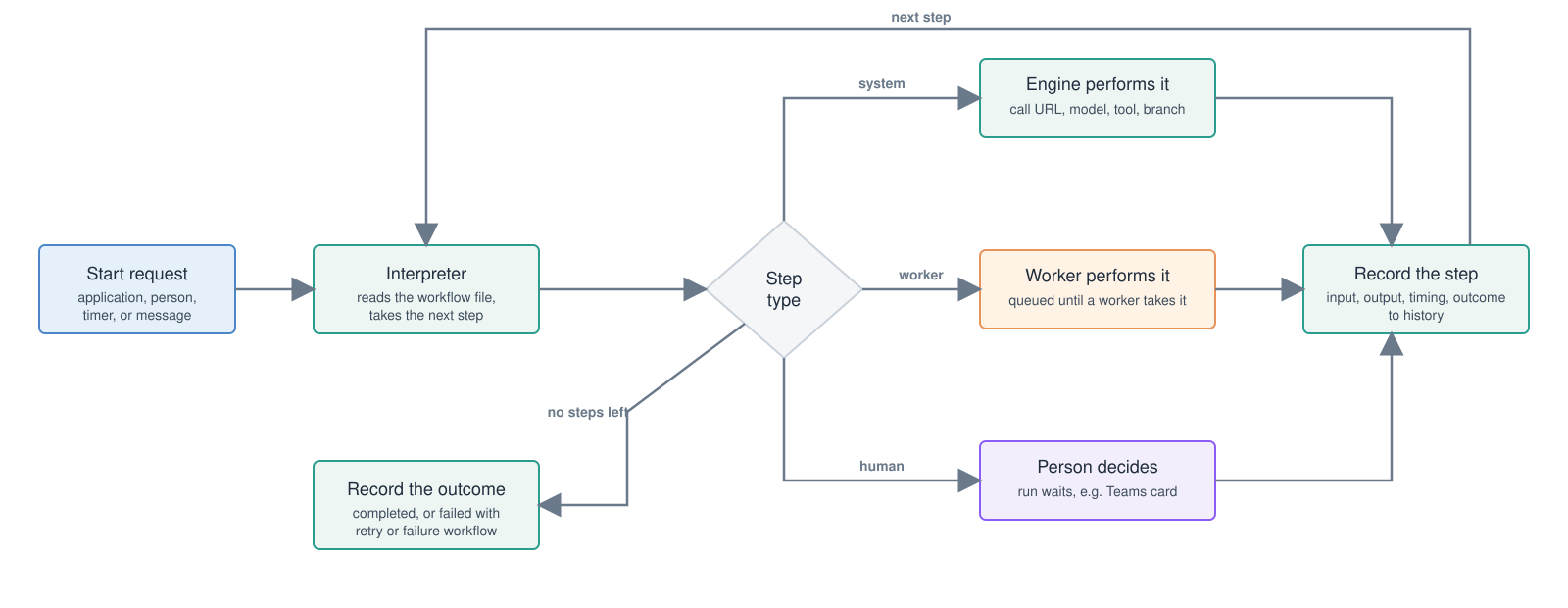
- Something starts a run: an application, a person, a timer, or an incoming message.
- The interpreter reads the workflow file and takes the first step.
- Generic steps are performed by the engine. Worker steps are queued until a worker takes them. Human steps wait for a decision.
- Each step's result is recorded and feeds the next.
- When no steps remain, the outcome is recorded. Failed runs are retried, or a named failure workflow starts.
Consequences for teams
| Activity | What it involves |
|---|---|
| Adding a workflow | One JSON file and a pull request. The pipeline validates and registers it. |
| Changing a workflow | A new version of the file. Running instances finish on the old version. |
| Adding a step type the engine cannot perform | A handler in a worker, maintained by the platform team. |
| Approving something | A card in Teams. |
| Seeing what happened | Every run, step, input, output, and decision is in the history, searchable by name, status, date, or business id. |
| Operating the engine | One application, a set of managed Azure services, and standard Azure monitoring. |
Summary
The engine runs processes described as data. One interpreter serves every workflow. Managed Azure services hold state, queues, and records. Generic steps are performed by the engine; steps that must run elsewhere are performed by workers that call in. People and models take part as steps, with human approval enforced before any change to data. Every step of every run is recorded.